
Intentora Visitor Guide: Help WordPress Visitors Find What They Need Faster
Recent Posts
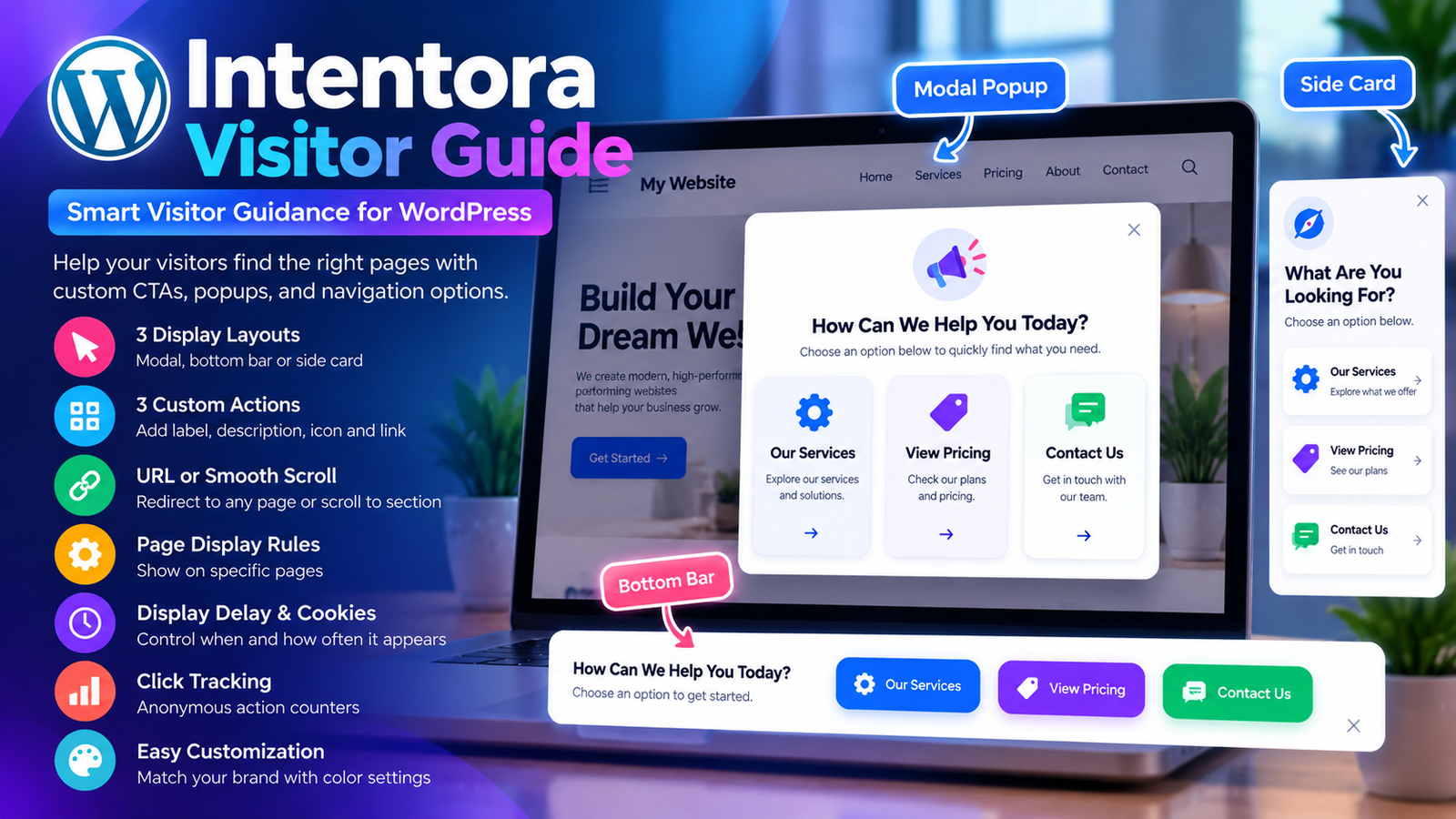
Getting visitors to your WordPress website is only the beginning. The real challenge is helping them discover the right information, explore relevant services, and take meaningful action.
A visitor might arrive on your homepage looking for pricing, another may want to explore your services, while someone else may be ready to contact your business.
When these options are difficult to find, visitors can become frustrated or leave without completing their intended action.
Intentora Visitor Guide offers a simple way to address this challenge.
Developed by WP Craft Engineer, this lightweight WordPress plugin displays a customizable visitor guidance interface that helps people choose what they want to do next.
Instead of forcing visitors to search through multiple menus and pages, you can present three clear actions that guide them toward relevant content.
In this article, we’ll explore how Intentora Visitor Guide works, its main features, and how it can help create a more intuitive WordPress website experience.
What Is Intentora Visitor Guide?
Intentora Visitor Guide is a WordPress plugin designed to help website visitors navigate toward relevant information through a simple, interactive guidance panel.
The plugin displays a customizable interface that asks visitors what they would like to do.
Website administrators can configure three action options, each with its own label, description, icon, and destination.
For example, a business website might offer the following choices:
- Explore Our Services – Discover available solutions.
- View Pricing – Learn about plans and costs.
- Contact Our Team – Get in touch with the business.
When a visitor selects an option, the plugin can redirect them to another page or smoothly scroll to a specific section of the current page.
This approach makes navigation more intentional and helps visitors find relevant information with fewer steps.
Why Visitor Guidance Matters for WordPress Websites
Modern websites often contain numerous pages, services, products, and informational sections.
Although traditional navigation menus remain essential, they do not always provide immediate direction to visitors who are unsure where to begin.
A visitor guidance system introduces a more focused experience.
1. Help Visitors Find Relevant Content Faster
Not every visitor wants to explore an entire website.
Some are looking for pricing information, while others want product details or contact options.
A visitor guide can present these choices immediately, making the website easier to explore.
2. Create a Clearer User Journey
A successful website should help users understand their available options.
By presenting three meaningful actions, Intentora Visitor Guide helps businesses organize common visitor journeys.
For example, a software company could guide visitors toward product features, pricing information, or a consultation request.
3. Highlight Important Website Actions
Calls to action are essential elements of business websites.
However, important buttons can become less noticeable when surrounded by extensive content.
A dedicated visitor guidance panel provides an additional opportunity to highlight useful destinations.
4. Reduce Unnecessary Navigation
Visitors should not have to open several pages just to locate a contact form or service section.
Direct links and smooth scrolling can reduce unnecessary navigation steps.
5. Support a More User-Friendly Experience
Clear navigation can make a website feel easier to use.
By offering a small number of relevant choices, businesses can help visitors make decisions without overwhelming them with too many options.
Key Features of Intentora Visitor Guide
1. Three Flexible Display Layouts
Different websites have different design requirements.
Intentora Visitor Guide provides three display layouts, allowing administrators to choose an interface that complements their website.
Modal Popup
The modal layout presents visitor guidance in a focused popup interface.
This can be useful for websites that want to introduce important navigation options prominently.
Bottom Bar
The bottom bar displays guidance near the bottom of the browser window.
It provides a more compact presentation while keeping navigation choices accessible.
Side Card
The side-card layout presents the guide in a smaller panel positioned alongside the website content.
This can be suitable for websites that prefer a less prominent guidance interface.
These layout options allow businesses to choose a presentation that matches their website design and visitor experience goals.
2. Three Customizable Visitor Actions
Intentora Visitor Guide allows administrators to configure three different actions.
Each action can have its own:
- Label.
- Supporting description.
- Icon.
- Destination.
For example, an online store could configure:
Action 1: Shop Products
Direct visitors to the main product catalogue.
Action 2: View Special Offers
Help customers discover current promotions.
Action 3: Contact Support
Guide visitors toward customer assistance.
The ability to customize these actions makes the plugin useful for different industries and website types.
3. URL Redirects and Smooth Anchor Scrolling
One of the plugin’s most useful features is its support for two navigation methods.
Redirect Visitors to Another Page
Administrators can configure an action to open a specific URL.
For example:
/services/
/shop/
/contact/
Full URLs can also be used when appropriate.
Scroll to a Section on the Current Page
The plugin also supports anchor destinations.
For example:
#pricing
#features
#contact
When a visitor selects an anchor-based action, the page can smoothly scroll to the relevant section.
This is particularly useful for landing pages and single-page business websites.
4. Customizable Headline and Supporting Text
A visitor guidance interface should reflect the language and tone of the website.
Intentora Visitor Guide allows administrators to customize the main headline and supporting description.
For example, a business website might use:
Headline: How Can We Help You Today?
Description: Choose an option below to quickly find the information you’re looking for.
An online store might use:
Headline: What Are You Shopping For?
Description: Explore our products, discover current offers, or get assistance.
This flexibility helps businesses create a more relevant visitor experience.
5. Page Display Rules
Not every page requires the same guidance interface.
A visitor guide may be useful on the homepage but unnecessary on certain internal pages.
Intentora Visitor Guide includes page display rules that allow administrators to control where the interface appears.
This helps website owners create a more intentional experience and avoid displaying the guide in unsuitable locations.
6. Configurable Display Delay
Timing can influence how visitors respond to website prompts.
Displaying a popup immediately may work for some websites, while others may prefer allowing visitors a few moments to explore.
Intentora Visitor Guide includes a configurable display delay.
Administrators can adjust when the guidance interface appears according to their website’s requirements.
For example, a business could configure the guide to appear after a short delay rather than immediately upon page load.
7. Cookie-Based Display Control
Repeatedly displaying the same popup can become frustrating for visitors.
Intentora Visitor Guide addresses this through a first-party cookie.
When a visitor selects an action or dismisses the guide, the plugin stores a cookie to prevent it from appearing again for a configurable number of days.
This provides greater control over how frequently visitors encounter the interface.
For example, a website administrator could configure the guide to remain hidden for several days after dismissal.
The result is a more considerate navigation experience.
8. Basic Color Customization
Website branding plays an important role in creating a consistent user experience.
Intentora Visitor Guide includes basic color controls, allowing administrators to adjust the appearance of the guidance interface.
These settings can help the guide complement an existing WordPress theme.
For example, a business with a blue-and-white brand identity can configure suitable colors for its visitor guidance elements.
9. Anonymous Click Tracking
Understanding which website actions attract visitor interest can be useful for improving navigation.
Intentora Visitor Guide includes anonymous aggregate click counters for its three configurable actions.
These counters help administrators understand which options visitors select most frequently.
For example, a business may discover that visitors select “View Pricing” more often than “Explore Services.”
This information could suggest that pricing deserves greater visibility elsewhere on the website.
The counters record aggregate action totals rather than identifying individual visitors.
10. Lightweight JavaScript Implementation
Website performance is an important consideration when installing WordPress plugins.
Intentora Visitor Guide uses vanilla JavaScript without depending on a frontend JavaScript framework.
Its focused implementation is designed to provide visitor guidance without introducing a large frontend framework dependency.
As with any WordPress plugin, overall performance will depend on the active theme, hosting environment, and other installed plugins.
11. Privacy-Conscious Functionality
Visitor privacy is an important consideration for modern websites.
Intentora Visitor Guide does not send visitor data to an external service.
Its optional action counters store anonymous aggregate totals rather than personal visitor information.
The plugin uses a first-party cookie to manage repeat appearances of the guidance interface.
Website owners should still review their applicable privacy and cookie disclosure requirements.
How Does Intentora Visitor Guide Work?
The plugin follows a simple visitor interaction process.
Step 1: A Visitor Opens Your Website
A customer lands on a page where the guide is enabled.
Step 2: The Guide Appears
Based on the configured display rules and delay, the visitor sees a modal, bottom bar, or side card.
Step 3: The Visitor Selects an Action
The visitor chooses one of the three configured options.
Step 4: The Plugin Navigates to the Destination
The selected action redirects the visitor to a page or scrolls to a specific section.
Step 5: The Guide Remembers the Interaction
A first-party cookie prevents the interface from appearing again during the configured period.
Step 6: Administrators Review Action Counts
Website owners can review anonymous aggregate click totals to understand which choices visitors prefer.
This process creates a simple navigation experience without requiring a complex chatbot or external automation platform.
Practical Example: Using Intentora Visitor Guide on a Business Website
Imagine a digital agency offering website development, SEO, and maintenance services.
Its homepage contains information about the agency, service descriptions, pricing options, and a contact form.
However, different visitors arrive with different intentions.
Some want to explore services. Others want pricing information. Some are ready to request a quote.
The agency could configure Intentora Visitor Guide with three options.
Option 1: Explore Our Services
Description: Discover our website development, SEO, and maintenance solutions.
Destination: /services/
Option 2: View Our Pricing
Description: Explore available packages and service options.
Destination: #pricing
Option 3: Request a Free Consultation
Description: Tell us about your project and connect with our team.
Destination: /contact/
Visitors can immediately select the option that matches their needs.
The agency can also review anonymous action counters to identify which options receive the most interaction.
This example demonstrates how a small navigation feature can support a clearer website experience.
Who Should Use Intentora Visitor Guide?
Intentora Visitor Guide can be useful for many different types of WordPress websites.
Business and Corporate Websites
Businesses can guide visitors toward services, pricing, contact information, and consultation requests.
WooCommerce Stores
Online retailers can direct shoppers toward product categories, special offers, or customer support pages.
Digital Marketing Agencies
Agencies can help prospective clients explore services, view portfolios, or request project estimates.
SaaS and Software Websites
Software businesses can guide visitors toward product features, pricing plans, and demonstration requests.
Educational Websites
Educational organizations can help visitors find courses, admission information, and enquiry forms.
Portfolio Websites
Freelancers and creative professionals can direct visitors toward their work, services, and contact information.
Landing Pages
Marketing landing pages can use anchor-based navigation to guide visitors toward important sections without requiring additional page loads.
Intentora Visitor Guide vs. Traditional Website Navigation
| Feature | Traditional Navigation | Intentora Visitor Guide |
|---|---|---|
| Visitor choices | Multiple menu links | Three focused actions |
| Navigation method | Standard links | URLs and smooth anchor scrolling |
| Display options | Theme-dependent menus | Modal, bottom bar, side card |
| Display timing | Usually always visible | Configurable delay |
| Repeat appearance | Generally persistent | Cookie-based display control |
| Action tracking | Requires separate analytics | Built-in aggregate click counters |
| Custom messaging | Depends on theme | Editable headline and descriptions |
Intentora Visitor Guide is not intended to replace the main website navigation.
Instead, it complements existing menus by providing a focused set of useful actions.
How to Install Intentora Visitor Guide in WordPress
Installing the plugin is straightforward.
Step 1: Download the Plugin
Visit the official WordPress Plugin Directory and download Intentora Visitor Guide.
Step 2: Upload and Install
Log in to your WordPress dashboard.
Navigate to:
Plugins → Add New Plugin → Upload Plugin
Upload the downloaded ZIP file and click Install Now.
Step 3: Activate the Plugin
Activate Intentora Visitor Guide after installation.
Step 4: Open Plugin Settings
Navigate to:
Settings → Intentora Visitor Guide
Step 5: Configure the Layout
Choose your preferred display layout:
- Modal.
- Bottom bar.
- Side card.
Step 6: Customize the Content
Add your headline, supporting text, and three visitor actions.
Step 7: Set Navigation Destinations
Configure each action to open a URL or scroll to an anchor.
Step 8: Adjust Display Rules
Choose the appropriate page rules, display delay, and cookie duration.
Step 9: Customize the Appearance
Adjust the available color settings to complement your website.
Step 10: Save and Test
Save the settings and test the guide on your website.
Check the navigation destinations, display timing, dismissal behavior, and layout on desktop and mobile devices.
Best Practices for Creating an Effective Visitor Guide
A visitor guidance interface works best when its options are relevant and easy to understand.
Use Clear Action Labels
Avoid generic labels such as “Option One” or “Click Here.”
Instead, use descriptive actions such as “View Pricing,” “Explore Services,” or “Contact Support.”
Focus on Visitor Intent
Think about why people visit your website.
Choose three actions that reflect the most common visitor goals.
Keep Descriptions Short
Supporting descriptions should explain the purpose of each action without overwhelming the visitor.
Avoid Excessive Interruptions
Use the display delay and cookie settings to create a comfortable experience.
Test Anchor Destinations
Make sure anchor links point to valid sections of your website.
Review Click Counters
Use anonymous aggregate action data to understand which options attract the most attention.
Maintain Visual Consistency
Choose colors and wording that complement your existing website design.
Can Intentora Visitor Guide Improve Website Conversions?
A well-designed visitor guidance interface can help visitors discover relevant actions more easily.
For example, making pricing and contact options more accessible may reduce the number of steps required to reach those pages.
However, installing a visitor guide does not automatically increase conversions.
Conversion performance depends on several factors, including website content, page design, audience relevance, service quality, and the clarity of your offers.
Intentora Visitor Guide can support conversion-focused navigation by highlighting useful destinations and helping visitors find the information they need.
For reliable results, businesses should evaluate the guide alongside their broader website analytics and conversion tracking.
Frequently Asked Questions
What is Intentora Visitor Guide?
Intentora Visitor Guide is a lightweight WordPress plugin that displays three configurable navigation actions through a modal, bottom bar, or side card.
Can I customize the visitor guide text?
Yes. You can edit the headline, supporting description, action labels, descriptions, and icons.
Can I link actions to different pages?
Yes. The plugin supports full URLs and relative URLs, including destinations such as /services/ and /contact/.
Does the plugin support smooth scrolling?
Yes. You can configure an action to scroll to an anchor on the current page, such as #pricing or #contact.
Can I choose where the guide appears?
Yes. The plugin provides page display rules to control where the guide is shown.
Can I delay the popup?
Yes. You can configure the display delay through the plugin settings.
Will the guide appear every time a visitor opens a page?
Not necessarily. The plugin uses a configurable first-party cookie after an action or dismissal to prevent repeated appearances for a specified period.
Does Intentora Visitor Guide collect personal data?
The plugin does not collect personal visitor data. Its optional action counters store anonymous aggregate totals.
Does the plugin send visitor information to an external service?
No. According to its official description, Intentora Visitor Guide does not send visitor data to an external service.
Does the plugin require a JavaScript framework?
No. It uses vanilla JavaScript without a frontend framework dependency.
Is Intentora Visitor Guide an AI chatbot?
No. It is a configurable visitor navigation and guidance plugin. Its actions follow administrator-defined destinations rather than generating AI responses.
Why Choose Intentora Visitor Guide?
WordPress offers flexible navigation options, but many websites benefit from a more focused way to guide visitors.
Intentora Visitor Guide provides this functionality through a straightforward interface.
Its main advantages include:
- Three configurable visitor actions.
- Modal, bottom bar, and side-card layouts.
- Customizable headlines, descriptions, and icons.
- URL redirects and smooth anchor scrolling.
- Page display rules.
- Configurable display delay.
- Cookie-based repeat display control.
- Basic color customization.
- Anonymous aggregate click counters.
- No external visitor data transmission.
- Lightweight vanilla JavaScript implementation.
These features make the plugin a useful option for website owners who want to provide clearer navigation without introducing an elaborate customer interaction system.
Final Thoughts
A successful WordPress website should do more than display information. It should help visitors find relevant content and take appropriate next steps.
Intentora Visitor Guide offers a simple approach to improving that experience.
By presenting three clearly defined actions, businesses can guide visitors toward services, pricing, products, contact pages, or specific content sections.
Its flexible layouts, customizable messaging, display controls, and anonymous click counters provide useful functionality without unnecessary complexity.
Whether you manage a business website, WooCommerce store, portfolio, or marketing landing page, Intentora Visitor Guide can help make your website navigation more purposeful and accessible.
Ready to make your WordPress website easier to explore?
Try Intentora Visitor Guide and give visitors a clearer path to the information they need.
Download Plugin: https://wordpress.org/plugins/intentora-visitor-guide/
Developed By: WP Craft Engineer