
Glitzy Booking Suite – WordPress Appointment Booking Plugin
Recent Posts
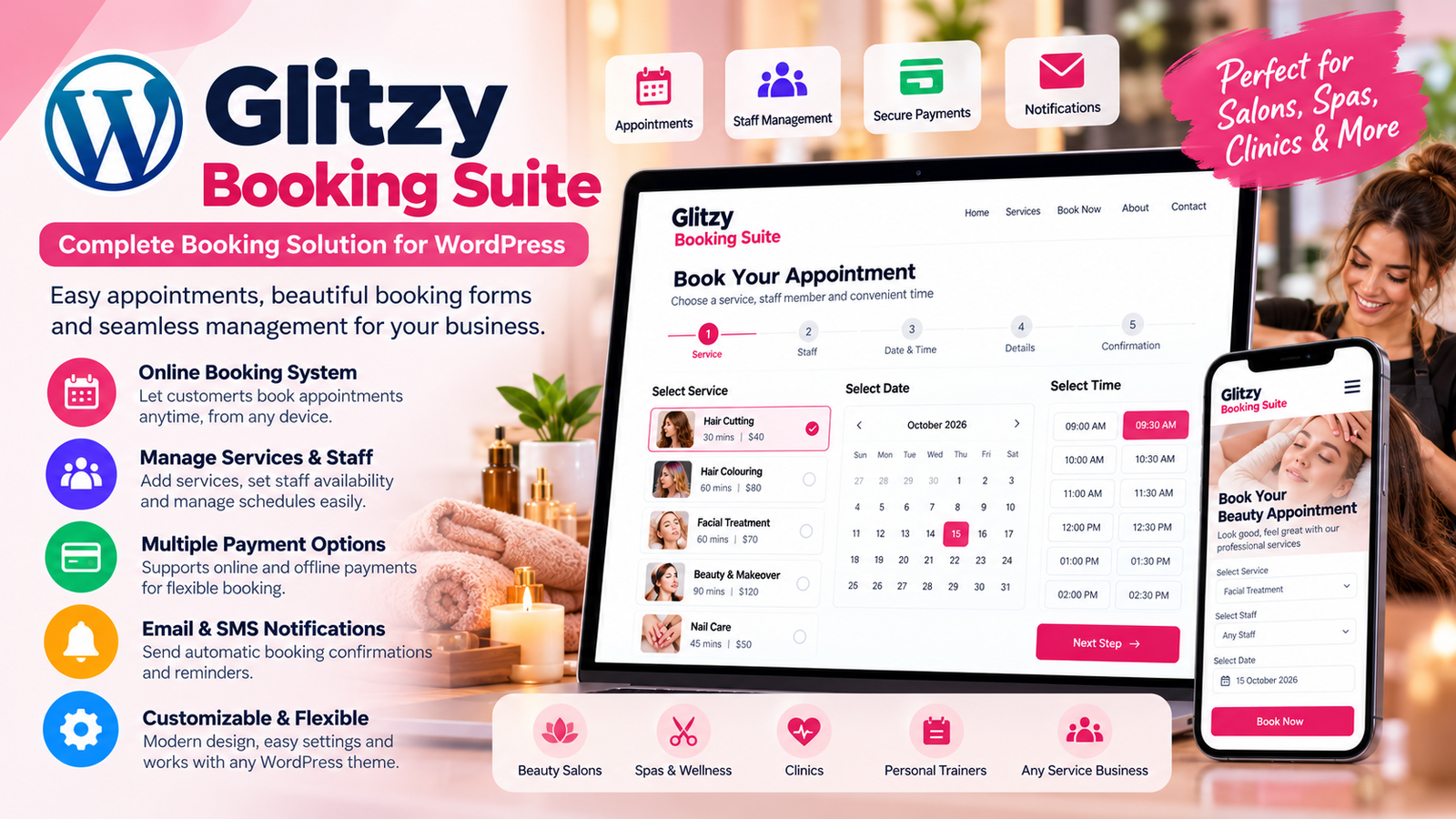
Glitzy Booking Suite: A Complete Free WordPress Appointment Booking Plugin for Modern Businesses
Managing appointments should be simple, whether you run a beauty salon, wellness center, consulting business, or professional service company. Yet many businesses still rely on phone calls, emails, spreadsheets, and manual scheduling to organize their bookings.
These traditional methods can create unnecessary administrative work, scheduling confusion, and missed opportunities.
A professional online booking system can make a significant difference.
Glitzy Booking Suite is a free WordPress appointment booking plugin designed to help service-based businesses accept reservations, manage staff availability, organize appointments, and provide customers with a convenient online booking experience.
Developed by WP Craft Engineer, the plugin brings appointment scheduling, customer management, payments, notifications, and reporting into one WordPress solution.
In this guide, we’ll explore how Glitzy Booking Suite works, its key features, and why it can be a practical choice for businesses looking to simplify appointment management.
What Is Glitzy Booking Suite?
Glitzy Booking Suite is an appointment scheduling and booking management plugin built specifically for WordPress.
It allows businesses to accept online bookings directly through their websites without requiring customers to visit a separate reservation platform.
Customers can select a service, choose an available staff member, pick a suitable date and time, enter their contact details, and submit their appointment request.
For business owners, the plugin provides administrative tools to manage services, staff, customers, appointment statuses, and payments.
Its core booking functionality is available for free, making it accessible to small businesses and growing service providers.
Why Your Business Needs an Online Appointment Booking System
Customers increasingly expect convenient digital experiences.
When someone wants to book a haircut, schedule a consultation, or arrange a wellness appointment, they may prefer completing the process online rather than waiting for a phone response.
An online appointment booking system offers several practical benefits.
1. Accept Bookings Beyond Business Hours
Your website remains accessible even when your business is closed.
Customers can explore services and submit appointment requests at a time that suits them.
This creates additional opportunities to capture bookings outside regular working hours.
2. Reduce Manual Scheduling Work
Handling appointments through phone calls and messages can be time-consuming.
A centralized booking system allows businesses to review appointment information in one location, reducing the need to maintain separate records.
3. Improve the Customer Experience
A clear booking process helps customers understand available services, appointment durations, staff options, and scheduling choices.
Providing this information upfront makes the reservation experience more convenient.
4. Keep Appointment Information Organized
Instead of searching through emails or spreadsheets, administrators can access booking details, customer information, and appointment statuses from the WordPress dashboard.
Key Features of Glitzy Booking Suite
1. Responsive Multi-Step Booking Form
Glitzy Booking Suite includes a step-by-step booking interface designed to make appointment scheduling straightforward.
Customers can complete their bookings through a structured process:
- Select a service.
- Choose an available staff member.
- Pick a date and time.
- Enter customer information.
- Review booking and payment details.
- Complete the booking process.
The responsive design supports desktop, tablet, and mobile devices.
This is particularly useful for businesses whose customers frequently access their websites from smartphones.
2. Service Management
Different businesses offer different services, each with its own duration and pricing.
For example, a beauty salon may provide haircuts, coloring, facials, and nail treatments.
Glitzy Booking Suite allows administrators to create and manage services through WordPress.
You can configure service details such as duration and pricing, helping customers choose the appointment that matches their requirements.
The plugin supports unlimited services, making it suitable for businesses with both small and extensive service catalogues.
3. Staff Management and Availability Scheduling
Managing multiple staff members can become complicated when everyone has different working hours and responsibilities.
Glitzy Booking Suite includes staff scheduling and availability management.
Administrators can add staff members and manage their availability, allowing customers to choose an appropriate professional during the booking process.
This can be especially helpful for salons, clinics, consulting firms, and wellness centers where appointments depend on individual staff schedules.
4. Centralized Appointment Dashboard
A professional booking system should make administration easier, not more complicated.
Glitzy Booking Suite provides a centralized WordPress booking dashboard where administrators can review appointments and related information.
The dashboard supports:
- Upcoming appointment management.
- Customer and service information.
- Assigned staff members.
- Booking statuses.
- Payment information.
- Appointment approval and status updates.
This provides a clearer overview of daily booking activity.
5. Recurring Appointment Booking
Many service businesses work with customers who require repeat appointments.
Examples include weekly fitness sessions, monthly beauty treatments, tutoring lessons, and regular coaching consultations.
Glitzy Booking Suite supports recurring appointment bookings, allowing customers to arrange repeat sessions.
This feature can help businesses manage ongoing customer relationships and recurring service schedules.
6. Online Payment Integration
Offering flexible payment methods can make the booking process more convenient.
Glitzy Booking Suite supports multiple payment options.
Stripe Checkout
Businesses can configure Stripe to accept supported online card payments.
PayPal Checkout
Customers can use PayPal when the integration is configured.
On-Site Payments
Businesses can also provide an on-site payment option when customers prefer to pay at the appointment location.
The plugin includes payment history and transaction records to support payment tracking.
Stripe and PayPal services may apply their own processing fees.
7. Email and SMS Booking Notifications
Communication is an important part of appointment management.
Customers need confirmation that their booking information has been received, while business administrators need visibility into new reservations.
Glitzy Booking Suite supports booking notification emails for both customers and administrators.
It also offers optional Twilio integration for SMS booking notifications.
These features help businesses maintain clearer communication throughout the booking process.
8. Google Calendar Integration
Businesses often use Google Calendar to organize meetings, appointments, and daily activities.
Glitzy Booking Suite supports optional Google Calendar integration.
When configured, confirmed bookings can create Google Calendar events.
This allows businesses to include website appointment information within an existing calendar workflow.
9. Coupons and Discount Codes
Promotions can help businesses introduce new services, reward repeat customers, or encourage bookings during quieter periods.
Glitzy Booking Suite includes coupon and discount code functionality.
Businesses can use discount codes for promotional campaigns and special offers.
For example, a wellness center could create a limited-time promotion for a seasonal treatment.
10. Booking Reports and Analytics
Understanding booking activity can help business owners make more informed operational decisions.
Glitzy Booking Suite includes reporting and analytics functionality for reviewing appointment-related information.
Administrators can use the reporting dashboard to assess booking activity and relevant business metrics.
This can support decisions about service availability, staffing, and future promotions.
Who Can Use Glitzy Booking Suite?
Glitzy Booking Suite is designed for appointment-based businesses across multiple industries.
Beauty Salons and Barber Shops
Customers can select treatments, choose stylists, and book suitable appointment times online.
Spas and Wellness Centers
Wellness businesses can manage treatment schedules, staff availability, and recurring appointments.
Clinics and Healthcare Practices
Clinics can use the booking system to organize appointment requests and staff schedules. Businesses handling sensitive patient information should separately assess their privacy and regulatory requirements.
Consultants and Business Coaches
Consultants can allow clients to schedule meetings or professional sessions through their websites.
Fitness Trainers and Yoga Studios
Trainers can organize individual sessions and recurring bookings.
Tutors and Educational Services
Tutors can offer structured appointment scheduling for lessons and consultations.
Repair and Home Service Businesses
Service providers can organize customer appointment requests for repairs, maintenance, and home visits.
How to Install Glitzy Booking Suite in WordPress
Setting up Glitzy Booking Suite follows a straightforward process.
Step 1: Install the Plugin
Log in to your WordPress dashboard and navigate to:
Plugins → Add New Plugin
Search for “Glitzy Booking Suite” and click Install Now.
Alternatively, download the plugin ZIP file from the official WordPress Plugin Directory and upload it manually.
Step 2: Activate the Plugin
After installation, activate Glitzy Booking Suite.
Step 3: Configure Plugin Settings
Navigate to:
Glitzy Booking → Settings
Review the available configuration options.
Step 4: Add Services and Staff
Create your services, configure pricing and duration, add staff members, and define availability.
Step 5: Configure Notifications and Payments
Set up the required email notifications and any optional payment or calendar integrations.
Step 6: Create a Booking Page
Create a new WordPress page named “Book Appointment” or “Online Booking.”
Add the following shortcode:
[glitzy_booking_form]
Step 7: Publish and Test
Publish the page and complete a test booking.
Verify that appointment information appears correctly in the dashboard and that configured notifications and payment options behave as expected.
Your website can now provide an online appointment booking experience.
Practical Example: Using Glitzy Booking Suite for a Beauty Salon
Imagine a beauty salon offering five services:
- Haircut – 30 minutes.
- Hair Coloring – 60 minutes.
- Facial Treatment – 60 minutes.
- Nail Care – 45 minutes.
- Bridal Makeup – 120 minutes.
The salon employs multiple professionals with different schedules.
Using Glitzy Booking Suite, the administrator can add these services, configure their durations and prices, and assign staff availability.
A customer visiting the website can select a facial treatment, choose an available professional, and pick an appointment time.
After entering their details, the customer can review the booking and choose an available payment method.
The administrator can then manage the appointment through the WordPress dashboard.
This workflow reduces the need for back-and-forth communication and keeps booking information organized.
Glitzy Booking Suite vs. Manual Appointment Management
| Feature | Manual Booking | Glitzy Booking Suite |
|---|---|---|
| Booking requests | Calls, messages, emails | Website booking form |
| Staff availability | Manual coordination | Staff scheduling tools |
| Customer records | Separate documents | Centralized customer management |
| Appointment calendar | Paper or spreadsheets | WordPress booking calendar |
| Payments | Separate collection process | Optional integrated payment gateways |
| Confirmations | Manual communication | Booking notification functionality |
| Recurring bookings | Manually arranged | Recurring appointment support |
| Reporting | Manual calculations | Booking reports and analytics |
The plugin brings several common appointment management activities into a single interface.
Is Glitzy Booking Suite Free?
Yes. Glitzy Booking Suite provides its core WordPress appointment booking functionality for free.
Businesses can use its scheduling, calendar, service management, staff management, customer management, recurring booking, and coupon features without purchasing a separate booking software subscription for the core plugin.
Optional third-party services such as Stripe, PayPal, and Twilio may involve transaction fees or usage charges.
This makes the plugin a practical option for businesses that want to start with a WordPress-based booking system while retaining flexibility for additional integrations.
Frequently Asked Questions
Can customers book appointments directly from my WordPress website?
Yes. Customers can use the frontend booking form to select services, staff members, dates, and available time slots.
Can I manage multiple staff members?
Yes. Glitzy Booking Suite supports multiple staff members and availability management.
Does the plugin support online payments?
Yes. It supports optional Stripe Checkout and PayPal Checkout integrations, as well as on-site payment options.
Can customers book recurring appointments?
Yes. Recurring appointment functionality is available for services that customers book regularly.
Does the plugin send booking confirmation emails?
Yes. Customer and administrator email notifications are supported through WordPress mail functionality.
Can I send SMS notifications?
Yes. Optional Twilio integration supports SMS booking notifications when configured.
Can I connect appointments with Google Calendar?
Yes. The plugin supports creating Google Calendar events for bookings when the integration is enabled and configured.
Is the booking form mobile-friendly?
Yes. The booking form is responsive and designed for desktop, tablet, and mobile devices.
Do I need coding knowledge to add the booking form?
No. You can insert the booking form into a WordPress page using the shortcode:
[glitzy_booking_form]
Is Glitzy Booking Suite suitable for businesses other than salons?
Yes. It can be used by consultants, tutors, fitness trainers, wellness centers, repair services, and many other appointment-based businesses.
Best Practices for Managing Online Appointments
Installing a booking plugin is an important first step, but thoughtful configuration is equally valuable.
Keep Service Information Accurate
Make sure service descriptions, durations, and prices reflect what your business offers.
Maintain Staff Availability
Review working hours and availability regularly so customers can choose appropriate appointment slots.
Test Payment Integrations
Before accepting live payments, verify that checkout, payment confirmation, and booking status updates work correctly.
Configure Notifications Carefully
Check that booking emails are delivered successfully and that optional SMS services are configured appropriately.
Review Appointment Reports
Use available booking information to understand demand and make operational improvements.
Protect Customer Information
Keep WordPress updated, restrict administrative access, and maintain an appropriate privacy policy for the information collected during bookings.
Why Choose Glitzy Booking Suite?
For many service businesses, the biggest challenge is not simply accepting appointments. It is managing the complete booking process efficiently.
Glitzy Booking Suite combines the essential elements of online appointment management into one WordPress plugin.
Its advantages include:
- Free core appointment booking functionality.
- Responsive multi-step booking experience.
- Unlimited services and staff members.
- Staff availability management.
- Centralized appointment administration.
- Recurring booking functionality.
- Optional Stripe and PayPal payments.
- Customer and administrator email notifications.
- Optional SMS and Google Calendar integrations.
- Coupon codes, reporting, and analytics.
- Easy shortcode-based WordPress integration.
These features make it worth considering for businesses that want to manage appointments through their existing WordPress websites.
Final Thoughts
A convenient appointment booking experience benefits both customers and business owners.
Customers want to choose services and book suitable time slots without unnecessary delays. Businesses need an organized way to manage appointments, staff schedules, payments, and customer information.
Glitzy Booking Suite provides a practical WordPress-based solution for these requirements.
With its free core booking system, responsive interface, flexible scheduling options, payment integrations, and administrative tools, the plugin offers useful functionality for a wide range of service businesses.
Whether you’re managing a beauty salon, running a consulting practice, offering fitness sessions, or providing professional services, Glitzy Booking Suite can help bring your appointment workflow into WordPress.
Ready to simplify your appointment booking process?
Explore Glitzy Booking Suite and start building a more convenient online booking experience for your customers.
Download Glitzy Booking Suite: https://wordpress.org/plugins/glitzy-booking-suite/
Developed by: WP Craft Engineer