
Craftengineer Article Highlights Box: Make Your WordPress Blog Posts More Useful and Reader-Friendly
Recent Posts
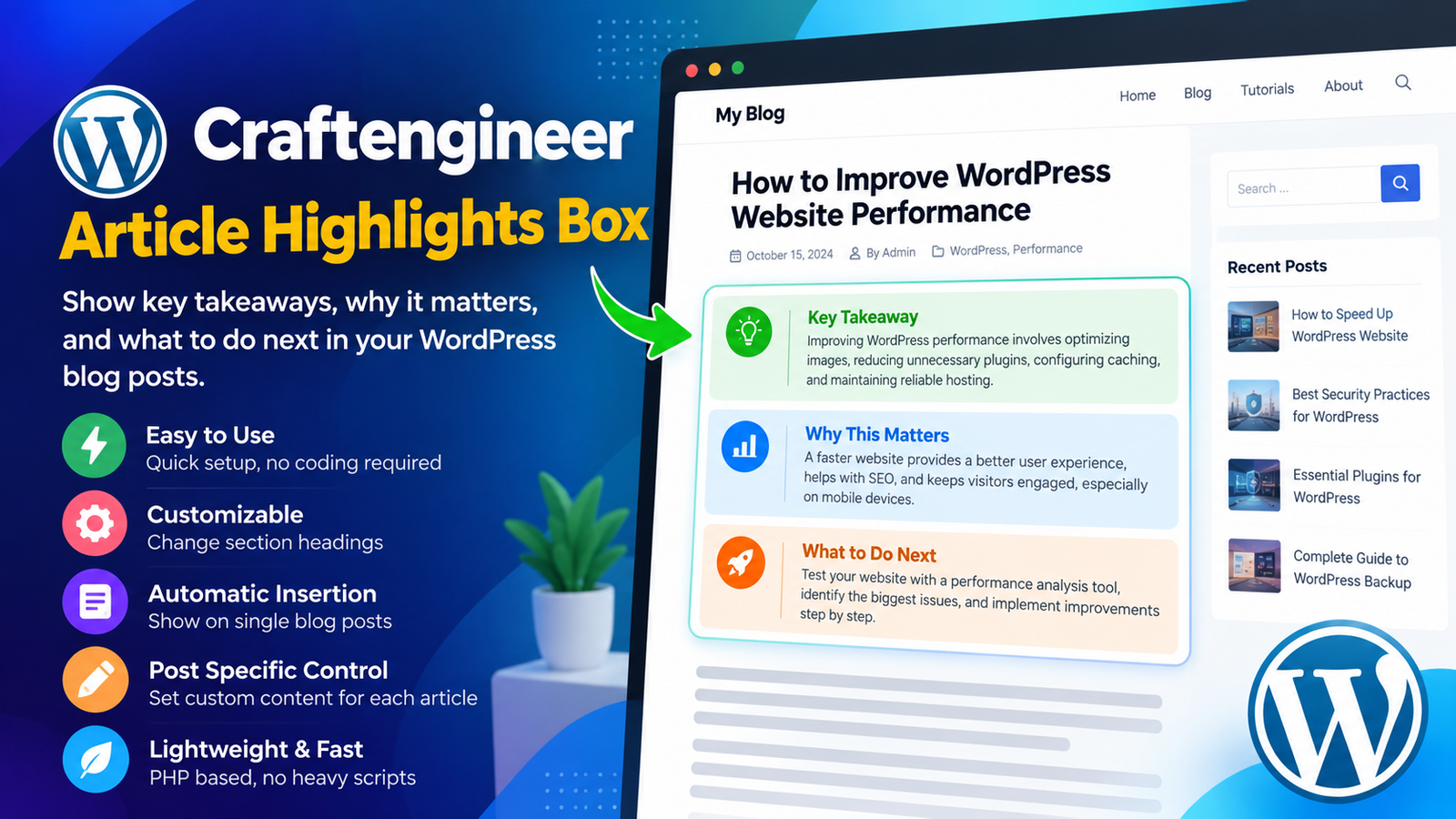
Publishing a great blog post is only half the challenge. The other half is helping visitors understand its value without making them search through paragraphs of content.
Whether you publish tutorials, educational resources, business insights, or technical articles, your readers often want three things: a clear takeaway, an explanation of why the topic matters, and practical advice about what to do next.
That’s where Craftengineer Article Highlights Box comes in.
Developed by WP Craft Engineer, this lightweight WordPress plugin introduces a structured highlights section to individual blog posts, helping website owners present important information in a simple, accessible format.
What Is Craftengineer Article Highlights Box?
Craftengineer Article Highlights Box is a WordPress plugin designed to display a concise information box within single blog posts.
Instead of requiring readers to work through an entire article before identifying its main message, the plugin organizes useful information into three sections:
- Key Takeaway: Communicates the central message of the article.
- Why This Matters: Explains the relevance or importance of the topic.
- What to Do Next: Provides readers with a practical next step.
These sections create a convenient starting point for visitors who want to understand an article’s purpose before exploring the full content.
The plugin integrates with the standard WordPress content system and does not require a separate page builder.
Why Article Highlights Matter for Modern Websites
Online readers approach content differently depending on their goals. Some want detailed explanations, while others are looking for a quick answer or an actionable recommendation.
A lengthy article can contain excellent information, but visitors may struggle to locate the details that matter most to them.
Adding a structured highlights box can improve the reading experience in several ways.
1. Help Readers Understand Your Content Faster
A highlights box introduces the main ideas before visitors begin reading the complete article.
For example, imagine publishing a detailed WordPress website optimization guide. Your article might explain caching, image compression, database maintenance, and hosting performance.
A short highlights section can communicate the overall recommendation immediately, giving readers useful context before they explore the technical details.
2. Make Long Articles Easier to Navigate
Long-form articles are valuable for explaining complex topics, but they can also require significant attention.
By presenting the main points in a clearly separated section, you give readers an additional way to understand the content.
This is particularly useful for technical tutorials, educational articles, industry insights, and practical guides.
3. Encourage Actionable Reading
Many articles explain a problem without clearly communicating what readers should do afterward.
The “What to Do Next” section addresses this by providing space for a relevant recommendation.
For example, an article about WordPress security might encourage readers to review their plugin updates, check backup configurations, or assess website permissions.
A practical next step helps connect the information in an article with a meaningful action.
Key Features of Craftengineer Article Highlights Box
The plugin focuses on simplicity, flexibility, and compatibility with the standard WordPress publishing experience.
Automatic Highlights Box Insertion
Craftengineer Article Highlights Box supports automatic insertion into single blog posts.
When enabled, the highlights section appears above the main post content, providing readers with a structured introduction.
Website administrators can manage this functionality from the plugin settings without manually modifying their theme templates.
Three Clearly Organized Content Sections
The plugin uses three complementary sections to organize article insights.
Key Takeaway
This section communicates the most important idea readers should remember.
Why This Matters
This section provides additional context and explains the significance of the article’s subject.
What to Do Next
This section guides readers toward a relevant action or recommendation.
Together, these sections create a straightforward content structure suitable for many different blogging topics.
Customizable Section Headings
Not every website uses the same editorial style.
A technical publication might prefer the heading “Recommended Action,” while an educational website might use “Next Steps.”
Craftengineer Article Highlights Box allows administrators to edit the default section headings through its WordPress settings page.
This helps publishers align the highlights box with their preferred writing style.
Individual Post Customization
Different articles require different summaries and recommendations.
The plugin supports post-specific content overrides using WordPress custom fields.
Website administrators can define individual values for the key takeaway, explanation, and next step.
This is useful when a general automatically generated highlights section does not communicate the intended message precisely.
Lightweight PHP-Based Implementation
Performance is an important consideration when selecting WordPress plugins.
Craftengineer Article Highlights Box uses a PHP-only implementation and integrates through the standard WordPress the_content filter.
The plugin does not depend on JavaScript for its core functionality.
Its focused implementation makes it an appealing option for website owners who prefer straightforward WordPress enhancements without unnecessary complexity.
Theme-Independent Integration
The plugin is designed to work independently of a particular WordPress theme.
Because it uses the WordPress content filter, it can integrate with conventional single-post content output without requiring a custom theme template.
As with any WordPress plugin, testing the appearance on your active theme is recommended before deploying it across a production website.
How to Install Craftengineer Article Highlights Box
Getting started is straightforward.
Step 1: Install the Plugin
Open your WordPress dashboard and navigate to Plugins → Add New Plugin.
Search for “Craftengineer Article Highlights Box” and install the plugin.
Alternatively, download it from the official WordPress Plugin Directory and upload the plugin ZIP file.
Step 2: Activate the Plugin
After installation, activate the plugin from the WordPress Plugins screen.
Step 3: Open Plugin Settings
Navigate to:
Settings → Craftengineer Article Highlights Box
Here, you can manage automatic insertion and customize the default section headings.
Step 4: Review a Blog Post
Open an existing published blog post on your website.
When automatic insertion is enabled, the highlights box should appear above the main article content.
Step 5: Customize Individual Articles
If an article needs specific highlights, use the supported WordPress custom fields to override the generated text.
The available custom field keys are:
_crafarhi_key_takeaway_crafarhi_why_matters_crafarhi_next_step
These fields allow you to provide tailored information for individual posts.
Practical Example: Using an Article Highlights Box
Imagine your website publishes an article titled:
“How to Improve WordPress Website Performance”
The highlights box could contain the following information.
Key Takeaway
Improving WordPress performance involves optimizing images, reducing unnecessary plugins, configuring caching, and maintaining reliable hosting.
Why This Matters
A faster website can provide a smoother browsing experience, particularly for visitors using mobile devices or slower internet connections.
What to Do Next
Test your website with a performance analysis tool, identify the largest bottlenecks, and prioritize improvements based on their potential impact.
This example demonstrates how a detailed article can be introduced through three short, meaningful sections.
The highlights box complements the full article rather than replacing it.
Who Should Use This WordPress Plugin?
Craftengineer Article Highlights Box can be useful for websites that publish informative or instructional content.
Technology and WordPress Blogs
Developers and technical writers can highlight important recommendations before explaining detailed implementation steps.
Business and Marketing Websites
Businesses can summarize insights, explain their commercial relevance, and guide readers toward practical recommendations.
Educational Websites
Educational publishers can present learning objectives, important concepts, and suggested follow-up activities.
Tutorial and How-To Blogs
Step-by-step guides can benefit from a short overview that explains the intended outcome before readers begin following instructions.
Professional Publications
Industry-focused blogs can communicate key observations and recommendations in a consistent editorial format.
Article Highlights vs. Traditional Blog Summaries
Traditional article summaries generally describe what a piece of content covers.
An article highlights box can go a step further by separating information into different purposes.
A conventional summary might explain that an article discusses WordPress security practices.
A structured highlights box can identify the main security recommendation, explain why it matters, and suggest an immediate action.
This distinction makes the format particularly useful for educational and action-oriented content.
It also allows publishers to create a consistent presentation across different articles.
Can Article Highlights Improve SEO?
Clear content organization can support a better reading experience, but installing a highlights plugin does not automatically improve Google rankings.
Search engine optimization depends on multiple factors, including content quality, relevance, technical performance, internal linking, and the usefulness of the information presented.
However, well-written article highlights can make important information easier for visitors to find and understand.
They can also encourage publishers to think more carefully about the main purpose and practical value of each article.
For best results, write highlights that accurately represent the content rather than repeating keywords unnecessarily.
Best Practices for Writing Effective Article Highlights
To make the most of Craftengineer Article Highlights Box, focus on clarity and usefulness.
Keep Your Key Takeaway Specific
Avoid vague statements such as “WordPress performance is important.”
Instead, explain the specific lesson or recommendation readers should remember.
Explain Real-World Relevance
Use the “Why This Matters” section to connect the article’s topic with a meaningful problem, benefit, or practical consideration.
Suggest a Realistic Next Step
The final section should provide an action that readers can reasonably take after reading the article.
Avoid Repeating the Introduction
Your highlights should summarize the essential value of the content rather than duplicate the opening paragraphs.
Customize Important Posts
For detailed guides or specialized topics, consider using the available custom fields to provide more precise article-specific highlights.
Why Choose Craftengineer Article Highlights Box?
WordPress provides considerable flexibility, but even small content presentation improvements can require custom development.
Craftengineer Article Highlights Box offers a focused solution for publishers who want structured article insights without building a custom feature from scratch.
Its key advantages include:
- Simple three-part highlights structure.
- Automatic insertion above single blog post content.
- Customizable heading labels.
- Individual post content overrides.
- Lightweight PHP-only implementation.
- Integration with standard WordPress content rendering.
- No requirement for a dedicated page builder.
Rather than introducing a complicated publishing workflow, the plugin focuses on one specific goal: making important article information easier to discover.
Final Thoughts
Creating valuable blog content takes time, research, and effort. Presenting that content effectively is equally important.
Craftengineer Article Highlights Box provides a practical way to introduce the central message of a WordPress article, explain its importance, and suggest a meaningful next step.
For bloggers, educators, developers, and business website owners, it offers a straightforward method for making articles more structured and reader-friendly.
If your website publishes tutorials, guides, or informative blog posts, adding article highlights could be a useful enhancement to your content presentation.
Ready to give your WordPress articles a clearer structure?
Explore Craftengineer Article Highlights Box and see how a simple highlights section can help readers understand the value of your content.
Download the plugin: https://wordpress.org/plugins/craftengineer-article-highlights-box/
Developed by: WP Craft Engineer